By default, SQLite tables have a special rowid column that uniquely
identifies each row. This rowid exists even if you have a user-specified
PRIMARY KEY on the table. How this rowid column behaves is influenced by
your PRIMARY KEY type.
Integer Primary Keys: If you have an integer primary key, then the primary
key column becomes an alias for the special rowid column. The rowid and your
user-defined primary key are literally just the same column.
Taking an example:
CREATE TABLE IF NOT EXISTS users(
  user_id INTEGER PRIMARY KEY,
  email TEXT,
);
In this case, since we’ve defined user_id to be an INTEGER PRIMARY KEY,
user_id becomes an alias for rowid. These two labels refer to the same
physical column.
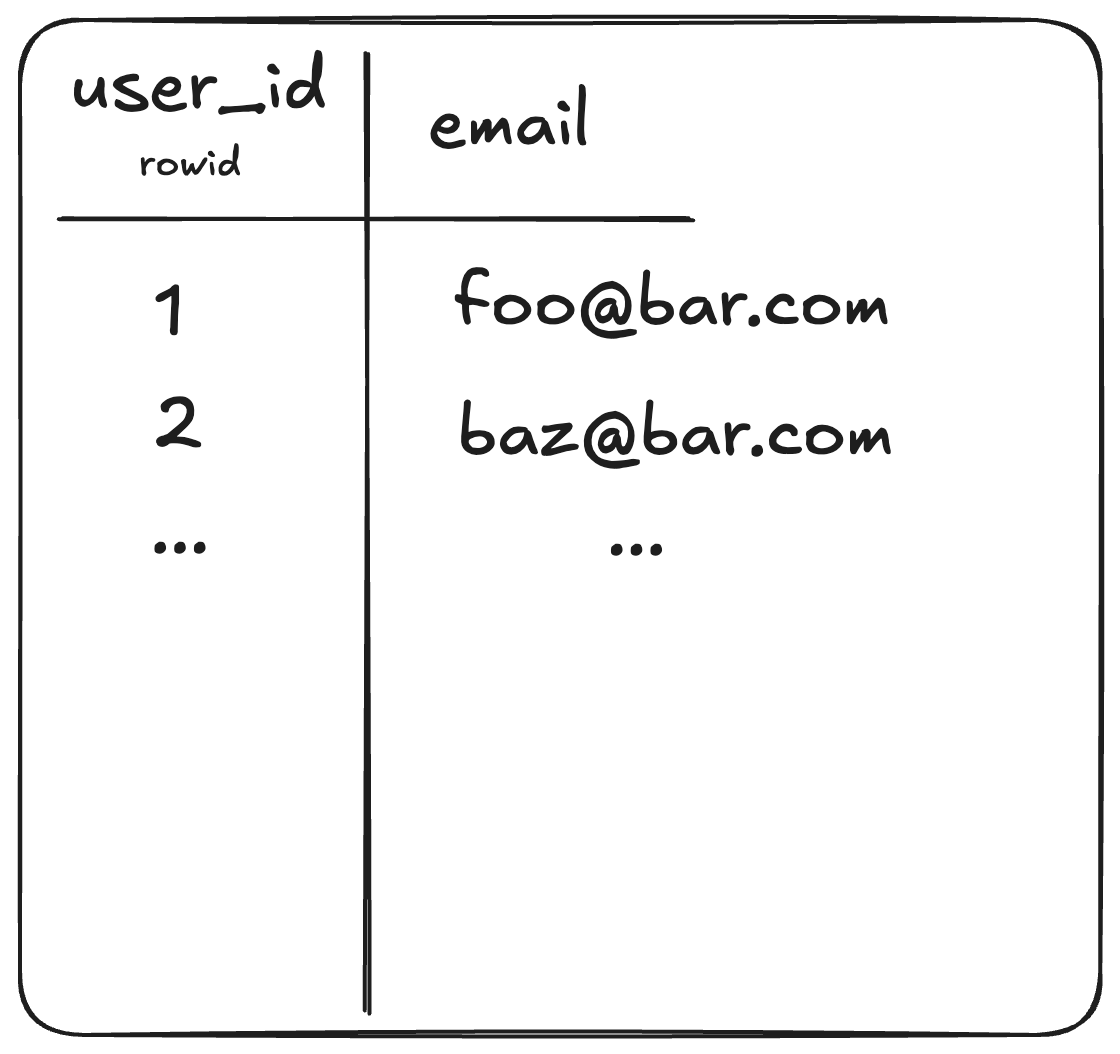
Figure 1: Integer primary keys are aliases for the rowid column
Non-Integer Primary Keys: When you use a non-integer primary key, such as
TEXT, SQLite actually implements the “primary key” as a UNIQUE INDEX between
rowid and your user-defined primary key.
SQLite stores data on disk in
B-trees. Table
rows and indices are both stored in B-trees. For non-integer primary keys, this
means that on disk, your table has at least two B-trees – one for the rows, and
another for the index between the rowid and primary key.
Taking an example:
CREATE TABLE IF NOT EXISTS page_views(
  page_url TEXT PRIMARY KEY,
  views INTEGER,
);
This table would have two on-disk B-trees. The first for the rows of
(rowid, page_url, views) and the second for the index entries of
(page_url, rowid).
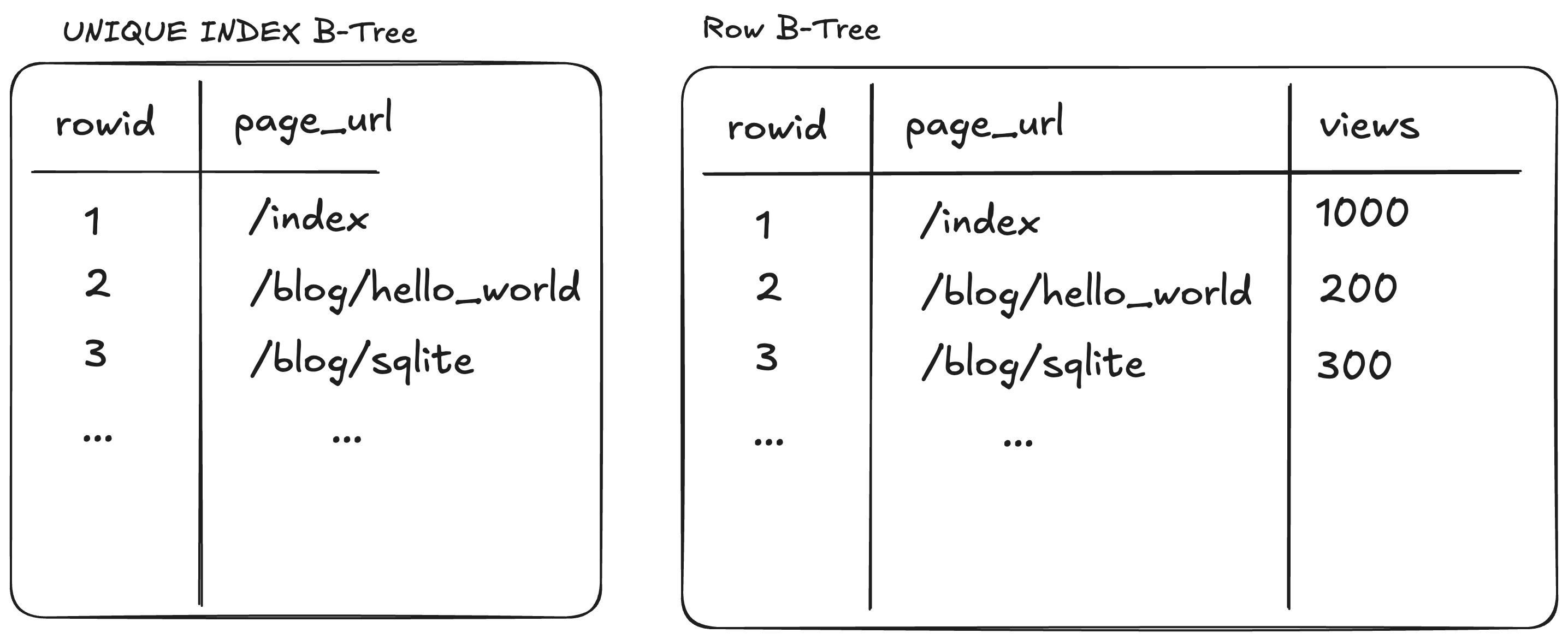
Figure 2: Non-integer primary keys
This two-tree structure has performance implications. If we were to do a query
like SELECT views FROM page_views WHERE page_url='/blog/sqlite', the SQLite
query engine has to first search the (page_url, rowid) B-tree to get the
rowid of the row with page_url=‘/blog/sqlite’, and then uses that rowid to
locate the full row in the (rowid, page_url, views) B-tree to get the views
from that row.
Enter WITHOUT ROWID
Adding the WITHOUT ROWID clause to a CREATE TABLE statement disables this
rowid behavior. For example:
CREATE TABLE IF NOT EXISTS page_views(
  page_url TEXT PRIMARY KEY,
  views INTEGER,
) WITHOUT ROWID;
Instead of creating the phantom rowid column, the primary key of a
WITHOUT ROWID table uses a “clustered index”. In this context, a clustered
index means that the row data and the primary key index are stored in the same
B-tree. The rows in this index are physically stored in order of the primary
key. Thus, there isn’t the need for a second look-up B-tree.
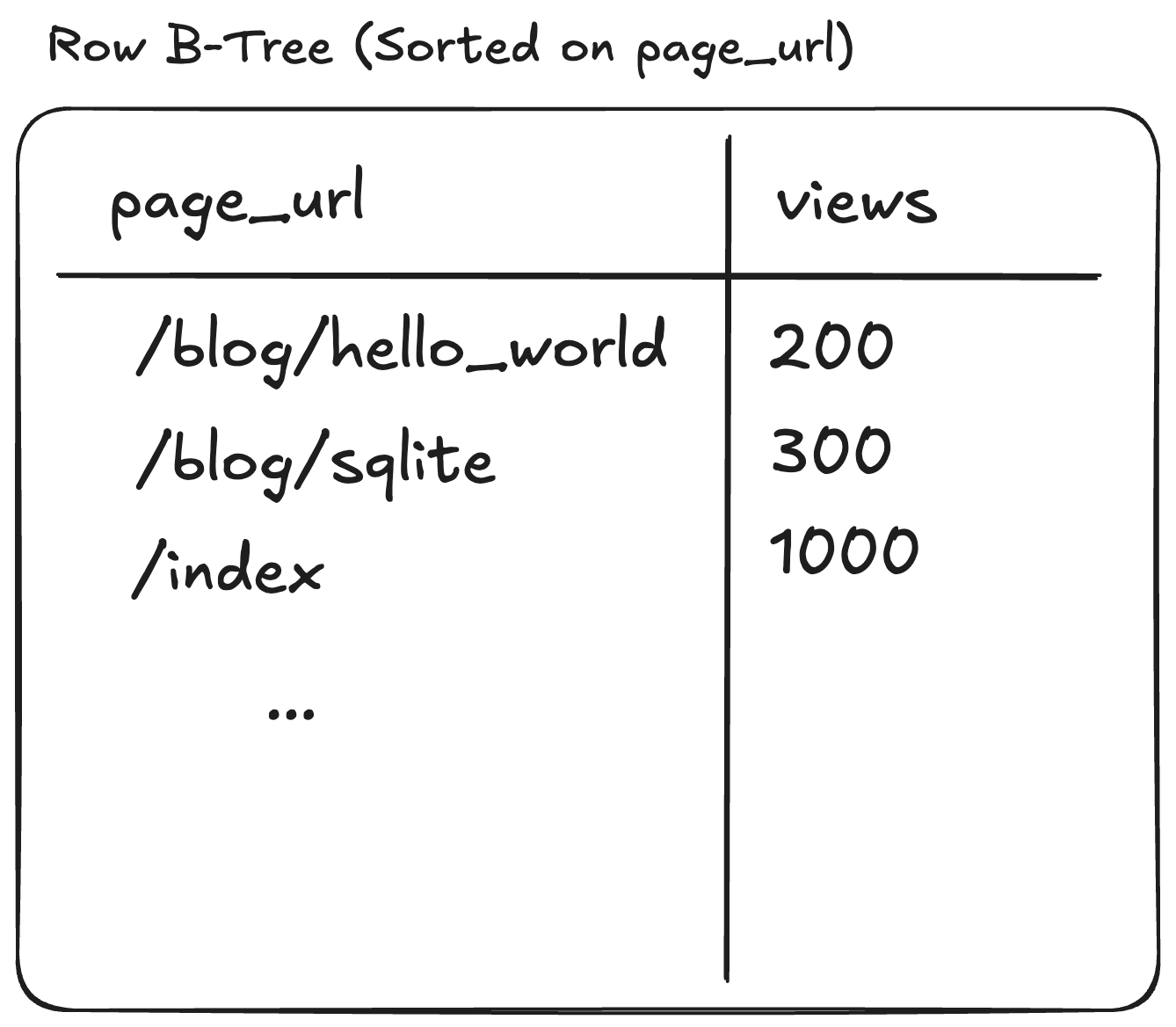
Figure 3: WITHOUT ROWID tables use a clustered index
Diagram note: Visualizing a B-tree as a table is a bit of an oversimplification. Note that in Figure 3, as opposed to Figure 2, the rows are stored in order of the primary key to gesture at the on-disk layout of the B-tree.
When to use WITHOUT ROWID:
- If you frequently lookup by primary key, or range scan by primary key, there
is a performance benefit to using
WITHOUT ROWID. - If you use an composite primary key, and frequently lookup by this key.
When NOT to use WITHOUT ROWID:
- If your primary keys are large. If your primary keys are large, then any
additional indices on the table will have to duplicate storage of the entire
primary key, instead of using the
rowidto refer to the entry. For instance, if you’re using a 200 byte string primary key, then every secondary index will include those 200 bytes, instead of the 8 byterowid. - If your table rows are large (e.g. they store a large blob). If your
table rows are large, then the disk layout of the table will be less
efficient as a
WITHOUT ROWIDtable. This is because SQLite uses a different type of B-tree – a B*-tree – layout forrowidtables that only stores data in leaf nodes, whereas clustered indices use a normal B-tree layout, which stores data in intermediate nodes. If the rows themselves are large, the storage of data in intermediate nodes can worsen the fan-out when searching the tree.
Learnings / Discussion
I dug into this concept more deeply when trying to read-optimize a SQLite
database that is used as a simple key-value on-disk cache. The notion of
disabling rowid for this table seemed appealing, until I realized that the
optimization was likely not worth it given that the table stored quite large
blobs in its rows, which would degrade the overall efficiency of the on-disk
layout. In any case, I got to learn more about SQLite internals, which was well
worth the time.
The SQLite documentation makes for a fascinating read and is exemplary technical writing. The SQLite project is a true treasure.
Further Reading: